New Version 18.05 Adds Keyframes!
UPDATE: Version 18.05 has been re-released (build 18.05.08) to fix a new crash bug on Windows and various issues with fade in / out following the new keyframes feature.
Version 18.05 is now available for DOWNLOAD!
Keyframes
Perhaps the most requested feature is the ability to move or smooth pan-and-zoom images or digital photos. We chose to address that in a more general manner by allowing filter parameters to be key-framed and animated rather than build something specific. Well, after long wait and much work, this has been introduced with a new Keyframes panel. It has an icon on the main toolbar to open the panel. There is much to say about this new feature and be sure to watch the videos as they become available. Keep in mind that this is new, incomplete, and a little unstable. Here are more caveats:
- No support for undo/redo (pending filter support for this)
- No keyboard shortcuts yet
- Not yet available for transitions or generators
- Only the following filters support keyframes at this time:
- Gain / Volume
- Brightness*
- Circular Frame (HTML proof-of-concept)
- Color Grading* (no simple)
- Opacity*
-
Size and Position* (simple only, no curve UI)
* = including the (still experimental) GPU filter
- Nearly every filter supports filter trimming (handles on the ends of the clip strip).
- Some filters only support simple keyframes (in/out controls on the clip strip).
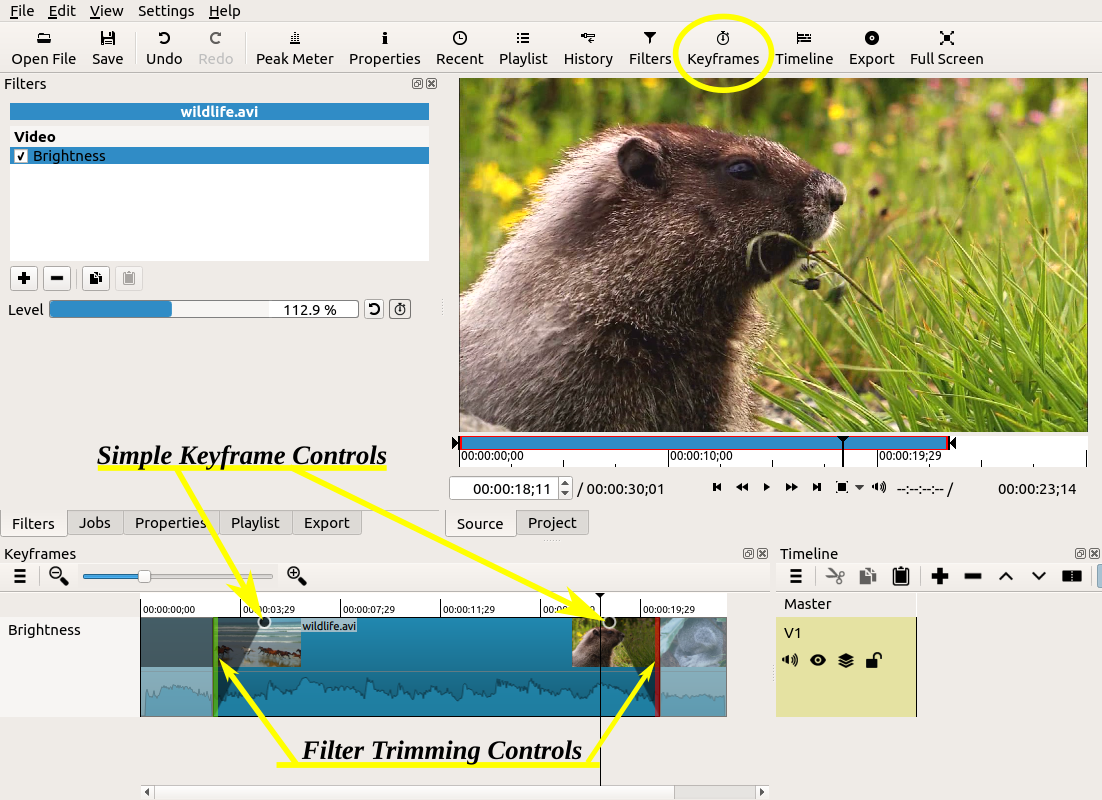
- Some filters only support advanced keyframes (rows below the clip strip).
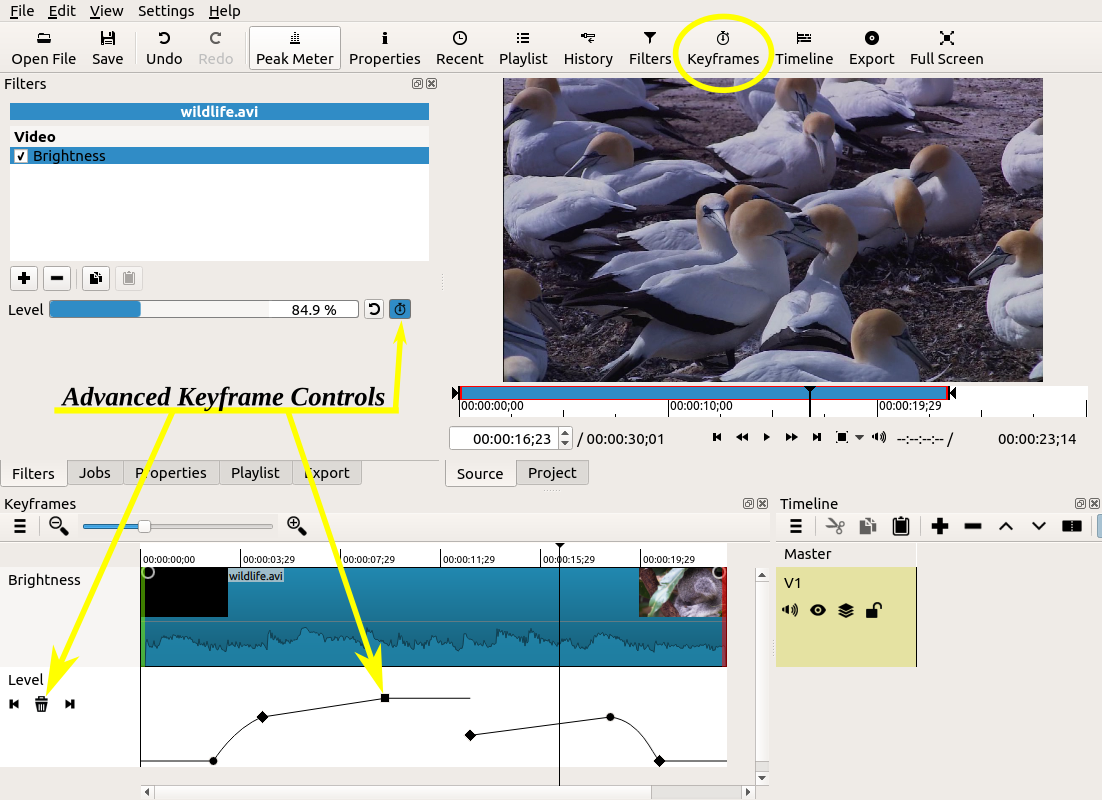
- Simple and advanced keyframes cannot be used at the same time on a particular instance of a filter.
- The keyframes cannot be dragged to new positions.
- You cannot add a keyframe by double-clicking somewhere on its curve.
- Not all parameters have a curve UI.
- You can right-click an advanced keyframe to show a menu with:
- Remove
- Keyframe Type (interpolation):
- Discrete (hold)
- Linear
- Smooth (Catmull-Rom spline)
Keyframes Tutorial Video
5.1 Surround Sound
Perhaps the least requested feature - but something that interests AV geeks (including the developers) - is support for different audio channel formats: mono (1) and 5.1 surround (6) in addition to the stereo that was always there. This is accessed via the Settings > Audio Channels menu and Export > Audio > Channels. Most users only need stereo; so, if you suddenly start to experience problems make sure that you did not leave this menu set to something other than stereo, which is the most stable. Also, this setting is saved into your project file (MLT XML), and the menu reflects the saved setting. However, it should revert back to the last setting you explicitly chose after starting a new project. This new feature also has notes and caveats:
-
View > Scopes > Audio Peak Meter and Audio Waveform shows each channel and their layout/order.
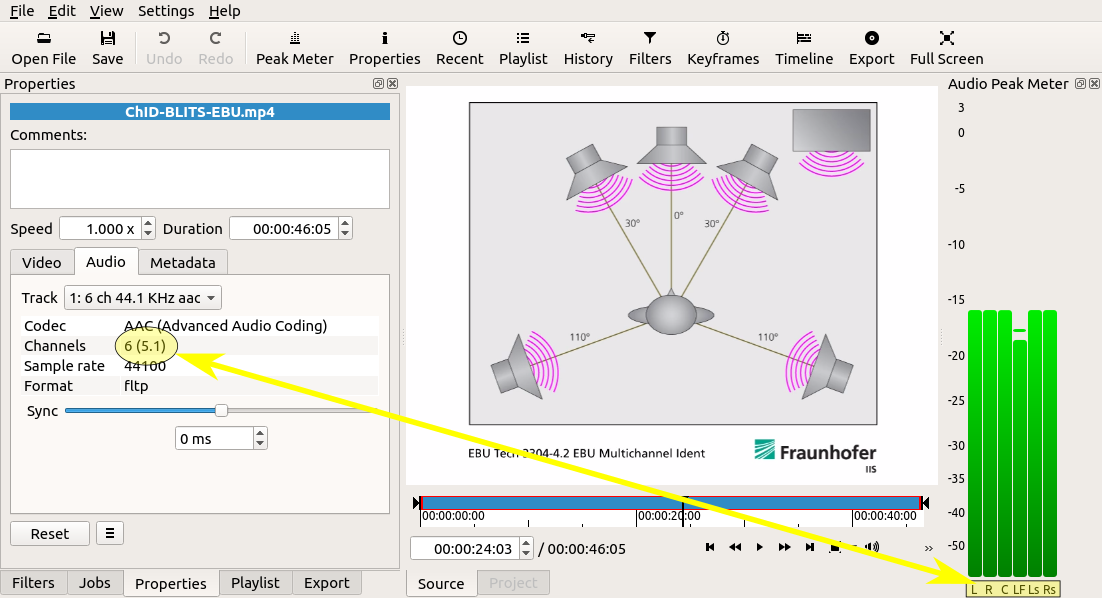
- The Timeline audio waveforms does not show a waveform of each channel. (Really this is just a graph of the audio power level across multiple channels.)
- No automatic mode that chooses the channel count from your first clip.
- No support in the Balance, Copy Channel, and Pan audio filters (yet).
- Some audio filters may crash with 6 channels!
- Not all export formats and audio codecs support surround. AAC and AC-3 are two that come to mind that do.
- Not every possible channel count and layout are supported (e.g. not 7.1).
- Alternative 6 channel layouts require a FFmpeg “channel_layout” to specified in Export > Other and is not reflected in the audio scopes.
Other
- Added Finnish translation.
- Restored GIF Animation for Export.
- Reduced memory footprint (especially for the Rotate and Size and Position filters).
- Changed default Export settings to reduce output size by increasing GOP and number of B frames.
New Release 18.03
Version 18.03 is now available for DOWNLOAD!
UPDATE: version 18.03 has been reissued (18.03.06) to address a couple of new bugs introduced: a crash loading SVG images, and broken renaming tracks. As a bonus, the Mosaic video filter has been added.
Here are the highlights of this release:
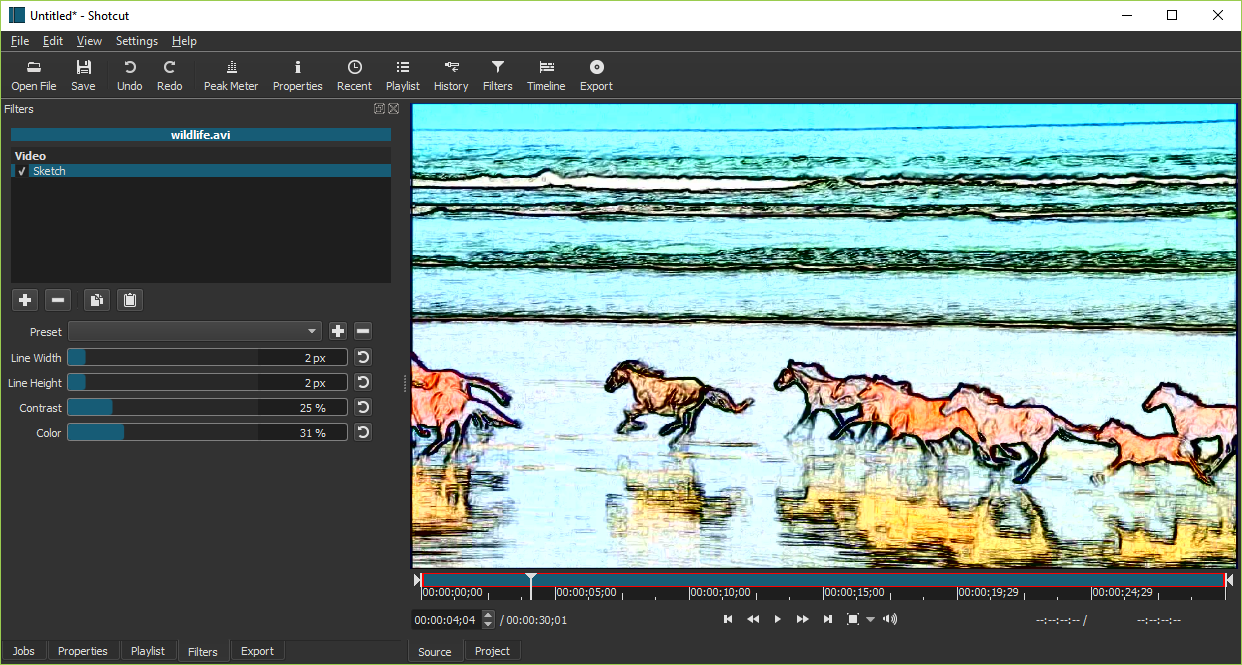
- Added a Sketch filter.
- Added numeric fields to the Color Grading filter.
- Added All option to Properties > Audio > Track.
- Added Estonian translation.
- Improved image loading speed on Windows.
- Improved mouse-wheel & trackpad scrolling in Timeline.
- Improved support for JACK Audio (Linux and macOS only).
- Upgraded FFmpeg to version 3.4 and latest vpx for much faster VP9 encoding.
- Upgrade MLT to v6.6.0.
- Upgraded SDL to version 2.0.
New Release 18.01
Version 18.01 is now available for DOWNLOAD!
Here are the main fixes and enhancements in this new version:
- Added Audio Spectrum Visualization filter.
- Added support for font size and italics to the Text filter.
- Added a Mask filter.
- Another important fix for accuracy of XML time values, particularly for non-integer frame rates.
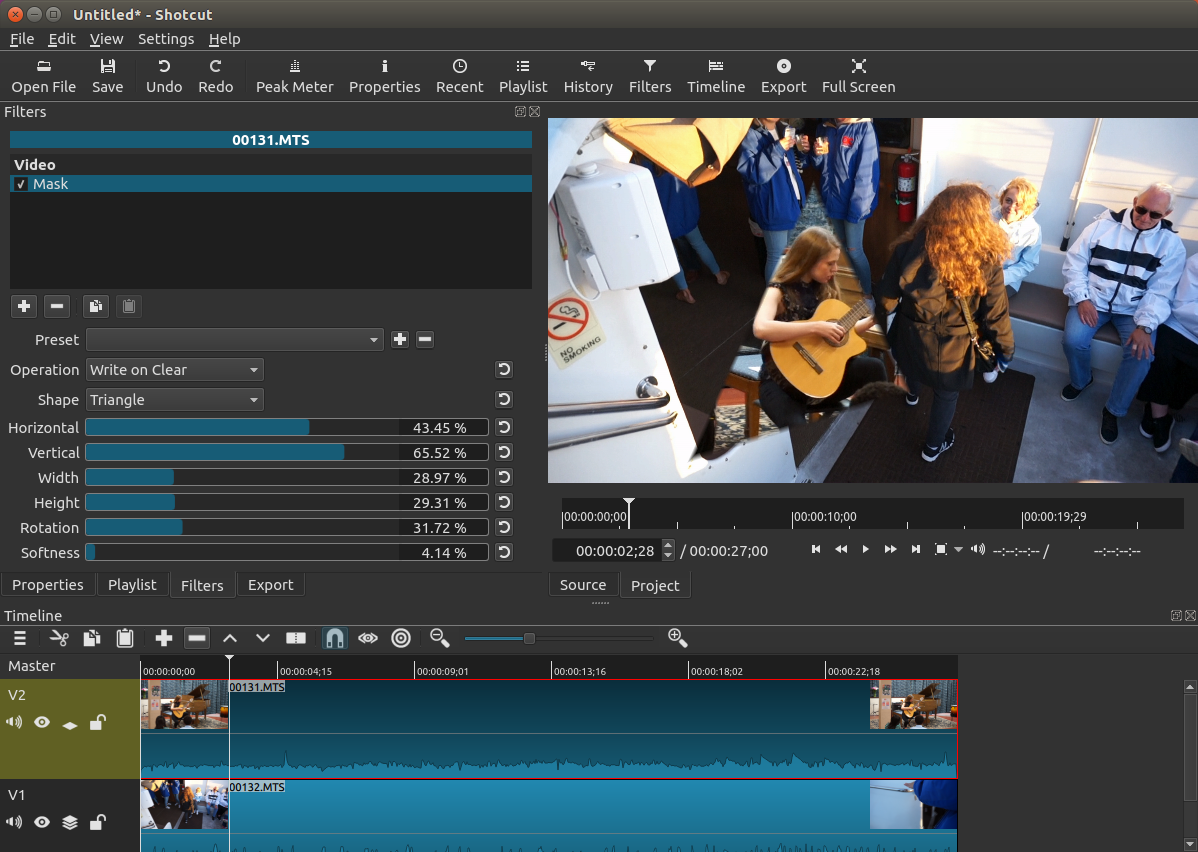
The following is a screenshot showing the new Mask filter with a diamond shape. This filter only writes into the alpha channel of the video, which is the transparency information. Therefore, it only shows results when compositing two video tracks on the Timeline.
New Release 17.12
Version 17.12 is now available for DOWNLOAD!
This new version of Shotcut includes improvements for performance, accuracy, and usability:
- Added icon, progress bar, and time remaining/taken to Jobs panel.
- Increased maximum resolution to 8192x8192.
- Indicate if variable frame rate is detected in Properties.
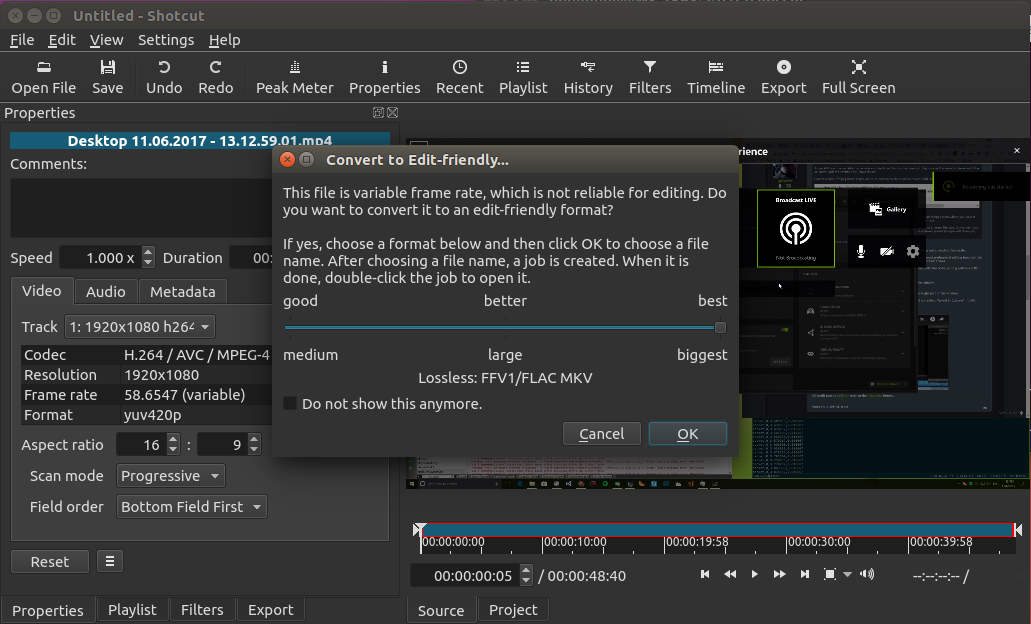
- Added Convert to Edit-friendly… dialog when variable frame rate or non-seekable file opened.
- Added Convert to Edit-friendly… to Properties menu for video and audio files.
- Adding, removing, and adjusting Fade In/Out filters now updates fade controls on the Timeline.
- Major speed improvements for Timeline rendering, especially when changing zoom level.
- Stop showing waveforms on muted tracks.
- Fixed audio crackling on some systems.
- Fixed accuracy of reading and writing time values, particularly for non-integer frame rates.
Shotcut tries hard to let you edit with many audio and video formats directly without a conversion or import process. However, like most video editors, there are some things that it simply cannot handle such as variable frame rate. Unfortunately many screen, game, and device capture tools create such files. Also, in order to support editing, Shotcut must be able to seek to a frame. This version now tries to detect if a file is variable frame rate or non-seekable and present a dialog to Convert to Edit-friendly format. To keep the process rather simple but still satisfy different users’ needs, it offers 3 pre-defined options. More than likely, all of them will create a file that is larger than the original, which is normal. However, at least you get some choice.
In addition, Shotcut (via MLT & FFmpeg) only does a basic seek test. When it succeeds, it is still not guaranteed to be frame accurate—that depends on many factors: format, codec, parameters of codec, the tool that wrote it, FFmpeg’s code, MLT’s code, versions, etc. There is simply no good way to reliably test for that at the moment. Also, even when seeking works, some files and the way they were encoded seek slowly and may require Settings > Interpolation > Bilinear or better to increase accuracy making it even slower. Therefore, you can choose to convert any audio or video clip to one of the edit-friendly (frame accurate and relatively fast-seeking) formats by using Properties > Menu > Convert to Edit-friendly….
New Release 17.11
UPDATE: Version 17.11 has been re-released (build 17.11.07) to fix a crash on MP3s with album art - a bug since v17.03.
Version 17.11 is now available for DOWNLOAD!
This new version of Shotcut has quite a few fixes plus the follow set of changes and additions.
- Changed add-filter menu to be embedded instead of popup.
- Added Master label to Timeline.
- Show filters icon on track heads if track is filtered.
- Prioritize ‘0’ shortcut for Timeline over Playlist.
- Do not adjust timeline zoom until slider is released.
- Added warning dialog to Export if file cannot be written (e.g. due to permissions).
- Added warning dialog to Export if chosen file is in the project.
- Added warning dialog to Export if the drive is low on space.
- Added Nepali translation.
- Added button to Text filter to insert the # symbol.
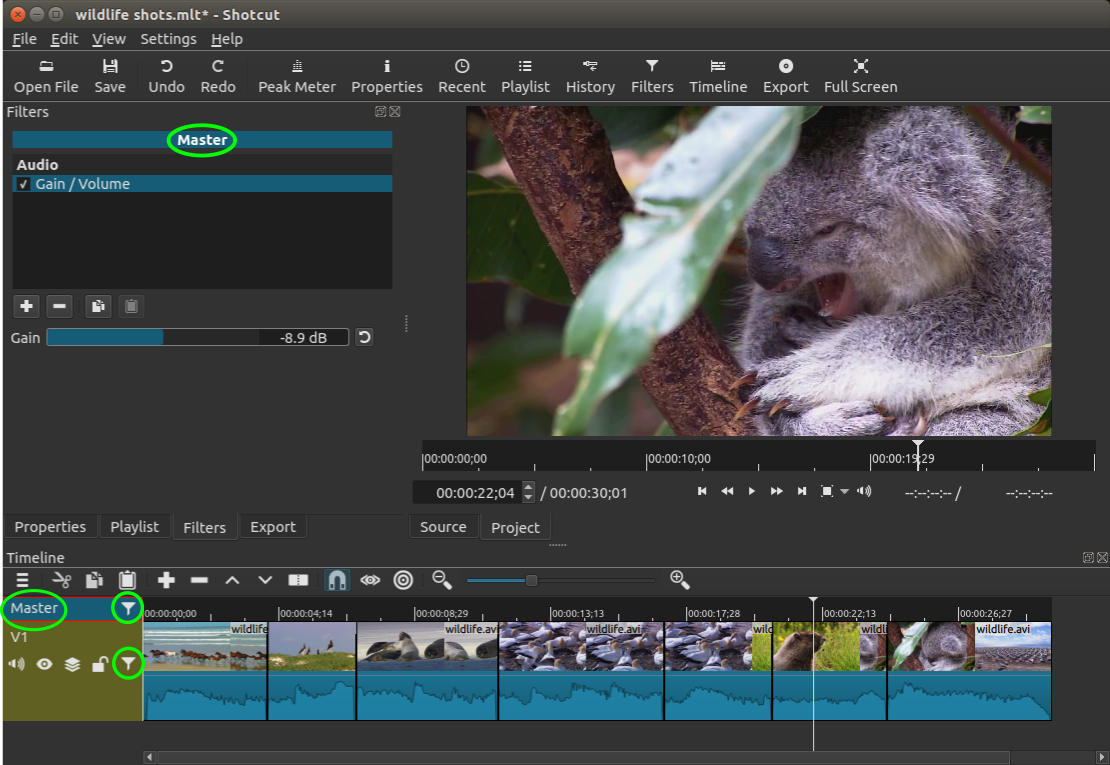
Shotcut lets you attach filters to many things - not only clips on the Timeline. You can also attach filters to a track or even the entire timeline. In previous blog and forum posts, I have referred to the top left corner block of the timeline as “cornerstone” for lack of another reference. Also, I compared the ability to filter the entire timeline (the result after compositing and mixing) as similar to the “master out” volume slider on a sound mixing console. Therefore, I added the label Master to this selectable block. Furthermore, if you had added a filter to a track (by selecting the track head) or to Master, then you could easily forget about it. Or it could have even occurred by accident! Therefore, Shotcut now shows a Filters icon on a track head if it has filters.
See the screenshot below. The Filters panel is showing the filters applied to Master because it is selected, and there is a Filters icon on the Master track head to indicate that it has filters.
Search
Recent Posts
- Posted on 27 Sep 2026
- Posted on 01 Aug 2026
- Posted on 25 Jun 2026
- Posted on 29 Apr 2026