The Discussion Forum Is Now Free
I decided to convert the discussion forum to be free-of-charge and supported through a moderate level of advertising. Some of you may know that I used to request a donation to gain membership. If you made a donation in the past 30 days, then advertising is turned off for you for next month. There might be an add-on package of services in the future that will include no ads in the forum. Thank you to everyone who contributed financially this year.
IMPORTANT: As a result of this change, if you already have an account on the forum you must reset your password.
Obviously, with the forum being free, the activity is going to increase, and I may not always be very active in there. Some employers have said something like “if only we could clone him….” ;-) Well, I am training my daughter who is in college to help me. Initially, she will be providing technical support and doing some web site maintenance. Eventually, I hope she can fix bugs and do development. This endeavor is turning into a nice father-daughter, dynamic-duo story!
Version 16.08 Re-released
The “performance boost for opaque clips on video tracks higher than V1” that was introduced for v16.08 was causing crashes with some filters. This was fixed in a new version 16.08.12.
New Release 16.08
Version 16.08 is now available for download. This version mostly contains fixes, but there are a couple of additions:
- Added count-down (or up) generator: File > Open Other > Count
- Major performance boost for opaque clips on video tracks higher than V1 with track Composite enabled and Blend mode: Over.

Export Frame in new v16.07 Release
Export Frame is a new feature in the File menu of Shotcut version 16.07. This feature lets you save the frame currently displayed in the Shotcut viewer as a still image file in PNG, JPEG, BMP, or WebP format. Simply use an appropriate file name extension to choose the desired format. This saves the frame as it is shown including the options in the Settings menu and Filters. Upon save, the new file is added to the Recent panel to make it convenient to open and use in Shotcut. This makes it easy to achieve a freeze frame effect. Simply navigate to the frame you want on the timeline, export it, open it, and Paste it. This also makes it convenient to create a custom thumbnail for your web video: export a frame, double-click it in Recent to open it in the Source viewer, add a text filter to title it, and re-export it.
As usual, there is also a collection a fixes - including for the new version checker, which did not work on many systems. Trimming on the timeline has been improved. In previous versions, if you accidentally started a transition while trimming and changed dragging direction to try to return to a trim operation, it would behave badly and create an undesired single-frame transition. Not only was that fixed, but also now you can remove a transition by trimming it away. So, Remove transition is now an action that can appear in your undo History that you can undo and redo.
New Release 16.06
Version 16.06 is now available for download. There are number of changes and additions in this release:
- Show red outline on scrub bar of Source player to indicate selection.
- Added Cut, Copy, and Paste to Edit menu and Timeline tool bar.
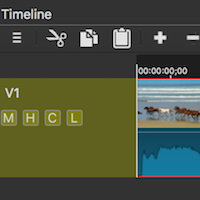
- Changed double-click on Timeline clip to select+seek instead of copying to Source player.
- Changed Timeline keyboard shortcut A to append.
- Changed Timeline keyboard shortcut C to copy.
- Changed Timeline keyboard shortcut Enter to seek to start of clip.
- Added Peak and True Peak meters to the Audio Loudness scope.
- Added version/upgrade-checker.
- Added check for missing files when opening .mlt XML project file.
- Added dialog to locate and resolve (relink) missing files in project file.
- For clips with speed changed, added support for saving and loading relative path and file names.
- Added Export EDL to the File menu.
- Added YouTube preset to Export (which does the same thing as not changing any export settings, not selecting an export preset, or clicking Reset).
- Updated Blackmagic Design SDI/HDMI output to work with recent driver updates.
Search
Recent Posts
- Posted on 27 Sep 2026
- Posted on 01 Aug 2026
- Posted on 25 Jun 2026
- Posted on 29 Apr 2026